-
PENCAP (or LINECAP) command. Its text arguments are the default “NONE”, furthermore “ROUND” and “SQUARE”. Source code of the attached picture:
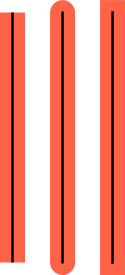
TO twolines
    PENDOWN PENSIZE 20 PENCOLOR “TOMATO”
    FORWARD 200
    PENSIZE 2 PENCOLOR “BLACK”
    BACK 200
    PENUP RIGHT 90 FORWARD 40 LEFT 90
END
HIDETURTLE
PENCAP “NONE”
twolines
PENCAP “ROUND”
twolines
PENCAP “SQUARE”
twolines
Unconnected thick lines could seem to be continuous with the new linecap settings, as in this SVG animation (random walk).
-
FORWARD “text” command: the turtle prints the text and moves to the end of the text, so it’s possible to continue the text with a similar command. The code of the attached picture:
PENUP
FONTCOLOR “GREEN”
FORWARD “LIBRE”
FONTCOLOR “GRAY”
FORWARD “LOGO”
-
Stable batch generation of cropped SVG images. Examples: Images with LibreLogo source code. The next program generates ten regular polygons from the equilateral triangle to the regular 12-gon:
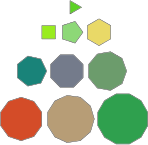
TO polygon n FILLCOLOR ANY REPEAT n [ FORWARD 20 RIGHT 360/n ] FILL END REPEAT 10 [ PICTURE “polygon%s.svg” % REPCOUNT [ polygon REPCOUNT + 2 ] ] -
Optional looping of SVG animations (it needs only a SLEEP command after the last shape). Source code of the attached random walk illustration:

PENCAP “ROUND” PENSIZE 5 HIDETURTLE PICTURE “random_walk.svg” [ REPEAT 50 [ SLEEP 50 HEADING 90 * INT RANDOM 4 FORWARD 20 ] SLEEP 50 ] -
Relative SVG image path of PICTURE is relative to the path of the document (or in the case of a new document without any saving the default path is the root of the user folder).